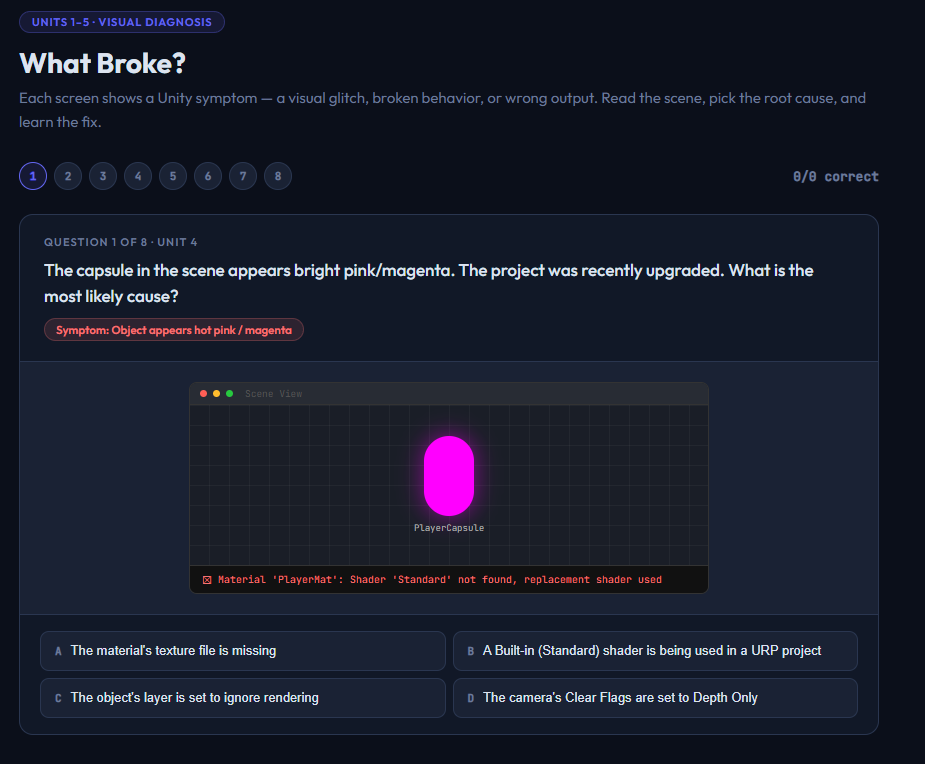
Five activities covering everything in the final polish phase of a Unity project — UI layout, audio pipeline, data persistence, and diagnosing real visual bugs.
Included activities:
1. Canvas Mode Selector Twelve UI scenarios with a legend summarizing Screen Space Overlay, Screen Space Camera, and World Space. Covers edge cases like post-processing affecting UI and UI elements that should hide behind 3D objects.
2. Anchor Configurator Ten UI layout scenarios paired with a live canvas preview that updates in real time as students hover over anchor preset buttons. Clicking locks in the answer. Ends with a printable anchor rules reference sheet.
3. Audio Chain Sorter Four components — AudioClip, AudioSource, AudioMixer, AudioListener — dragged into the correct signal path order. Full explanation shows what each component does and why it sits where it does.
4. PlayerPrefs Type Challenge Eight C# PlayerPrefs snippets. Students identify whether each is valid or what’s wrong. Covers SetBool (doesn’t exist), SetVector3 (doesn’t exist), correct SetInt/GetFloat/SetString usage, HasKey, DeleteAll, and default value best practices. The SetBool question is flagged as a direct UCA exam target.
5. What Broke? Eight Unity scenarios each paired with a visual mockup of the actual symptom — a genuinely pink/magenta capsule, a ball sinking through the floor, a completely black Game View, a health bar stuck at full. Students identify the root cause and receive a concrete “what to click in Unity” fix.
Instant digital download. All five activities open in any browser. No setup required.
CSTA Standards:
| Standard | Code | Description |
|---|---|---|
| Algorithms & Programming | 3A-AP-13 | Create prototypes that use algorithms to solve computational problems |
| Algorithms & Programming | 3A-AP-21 | Evaluate and refine computational artifacts to make them more usable |
| Computing Systems | 3A-CS-01 | Explain how abstractions hide complexity |
| Algorithms & Programming | 2-AP-11 | Creates clearly named variables that store data |
Also aligns to: Georgia CTAE Game Design: Animation & Simulation · Unity Certified Associate exam domain: UI, Audio & Build

Reviews
There are no reviews yet.