The Create PT is worth 30% of the AP CSP score — and most students lose points not because their program is bad, but because their written responses don’t hit the rubric. This toolkit fixes that.
Four interactive browser-based tools that walk students through every rubric row, model what earning looks like, and check their work before they submit.
What’s included:
Rubric Explorer All 6 rubric rows in an expandable accordion. Each row includes the official College Board rubric language, a plain-English translation, side-by-side earn/don’t-earn examples with real code, and a common mistakes section. Row 3 (managing complexity) gets extra detail including the “replacement test” explained clearly. Jump bar at the top to skip to any row.
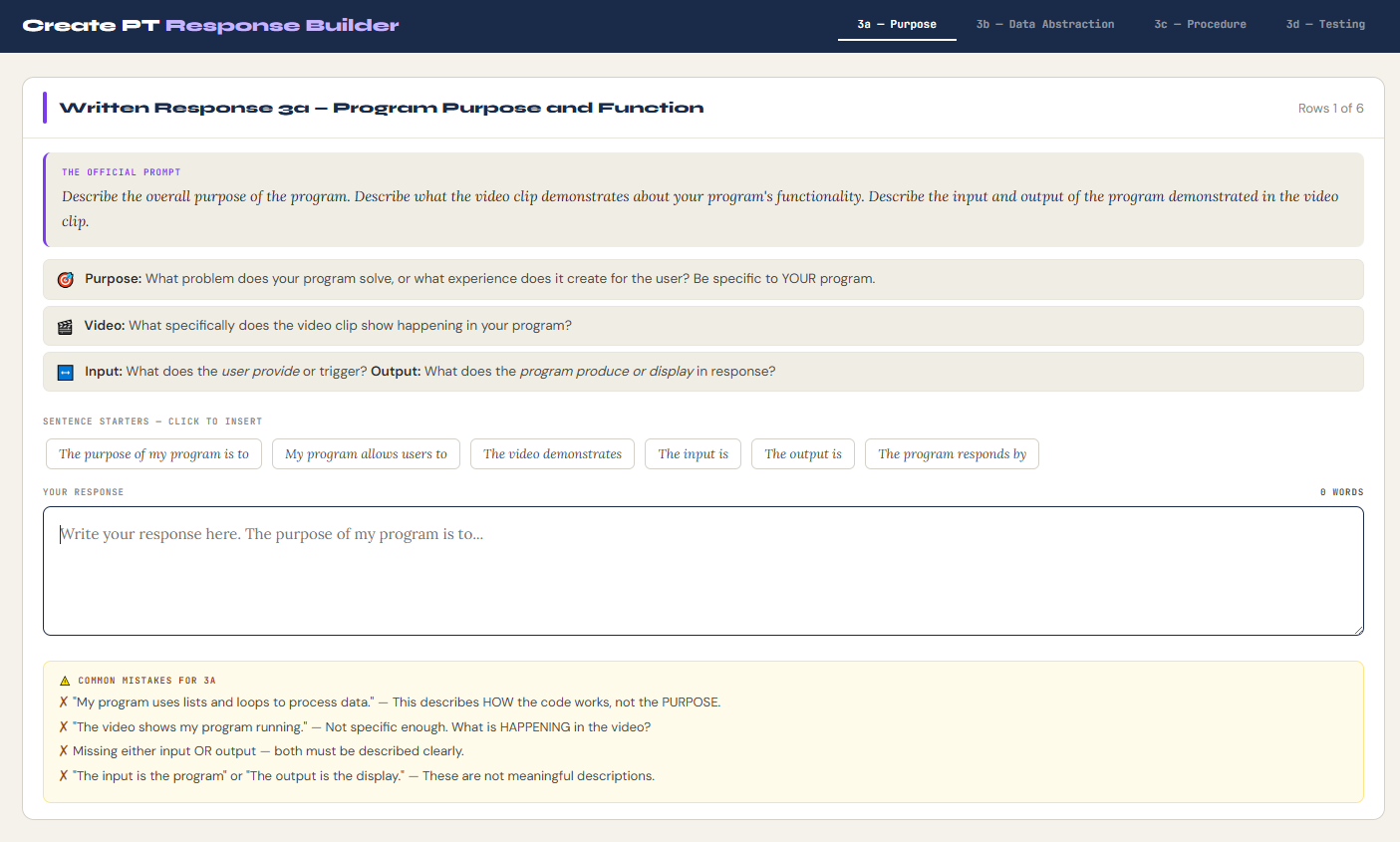
Written Response Builder Tabbed scaffold for prompts 3a, 3b, 3c, and 3d. Each tab shows the official prompt, what the rubric requires, clickable sentence starters that insert into the text area, and a live quality checker that analyzes the response as the student types — flagging if input, output, parameter description, step-by-step explanation, or testing calls are missing. Each tab also has a common mistakes warning panel.
Sample Program Scorer Three complete Python programs with full written responses — a vocabulary quiz, a grade tracker, and a budget tool. Students score each rubric row as Earned/Not Earned before the explanation reveals. Sample A earns 6/6, Sample B earns 2/6 (mimicking the most common student mistake patterns), Sample C earns 6/6. “Reveal All” shows the official scoring with detailed per-row reasoning.
Code Requirements Checklist 30 items organized by rubric row. Students click through each requirement — once for ✓, twice for ✗ (flagged missing). Hard requirements labeled in red. Row-by-row progress counters update live. Once enough items are checked, a summary panel appears with green/amber/red status per row and a targeted message about what needs fixing before submission.
The Written Response Builder’s live quality checker alone is worth the price of this toolkit. Students consistently lose points on 3b and 3c because they describe what the code does instead of how it works — the checker catches that before submission.
All tools open in any browser. No login, no College Board account, no software required. Instant digital download.
College Board AP CSP Alignment:
| Rubric Row | Focus | Tools |
|---|---|---|
| Row 1 | Program Purpose & Function | Rubric Explorer, Written Response Builder (3a), Code Checklist |
| Row 2 | Data Abstraction | Rubric Explorer, Written Response Builder (3b), Sample Scorer |
| Row 3 | Managing Complexity | Rubric Explorer (with replacement test), Code Checklist |
| Row 4 | Procedural Abstraction | Written Response Builder (3c), Sample Scorer, Code Checklist |
| Row 5 | Algorithm Implementation | Written Response Builder (3b/3c), Sample Scorer |
| Row 6 | Testing | Written Response Builder (3d), Sample Scorer, Code Checklist |
Also aligns to:
- College Board AP CSP Create Performance Task scoring guidelines
- College Board Computational Thinking Practices 1, 2, 3, 4, 6
- CSTA Standards: 3A-AP-13, 3A-AP-17, 3A-AP-21

Reviews
There are no reviews yet.