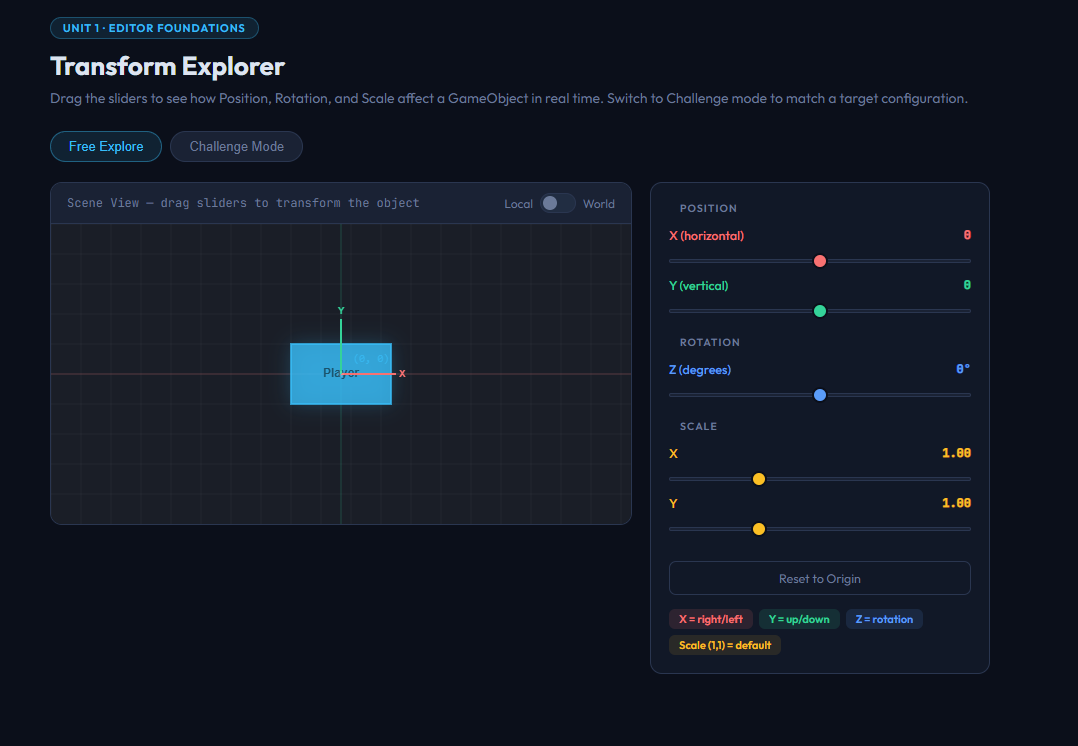
Give your students a tactile understanding of Unity’s Transform component before they ever open the engine.
This interactive HTML activity renders a live canvas with a moveable object that responds in real time as students drag sliders for Position X/Y, Rotation Z, and Scale X/Y. Local axis arrows update dynamically as the object rotates, giving students a visual anchor for understanding local vs. world space.
Two modes included:
- Free Explore — open-ended experimentation with no constraints
- Challenge Mode — a dashed target configuration appears and students adjust sliders to match it exactly. A Peek Answer button reveals the solution if they get stuck.
Perfect for:
- Introducing the Transform component before Roll-a-Ball or any movement scripting
- Reinforcing the difference between local and world coordinates
- A low-stakes warm-up activity at the start of a Unity unit
Instant digital download. Opens in any browser. No Unity license required.
CSTA Standards:
| Standard | Code | Description |
|---|---|---|
| Algorithms & Programming | 3A-AP-13 | Create prototypes that use algorithms to solve computational problems |
| Computing Systems | 3A-CS-01 | Explain how abstractions hide the complexity of computing systems |
Also aligns to: Georgia CTAE Game Design: Animation & Simulation pathway · Unity Certified Associate exam domain: Editor Tools & Transforms

Reviews
There are no reviews yet.